Dedicated Theater Room vs Living Room Setup - The Honest Trade-Offs
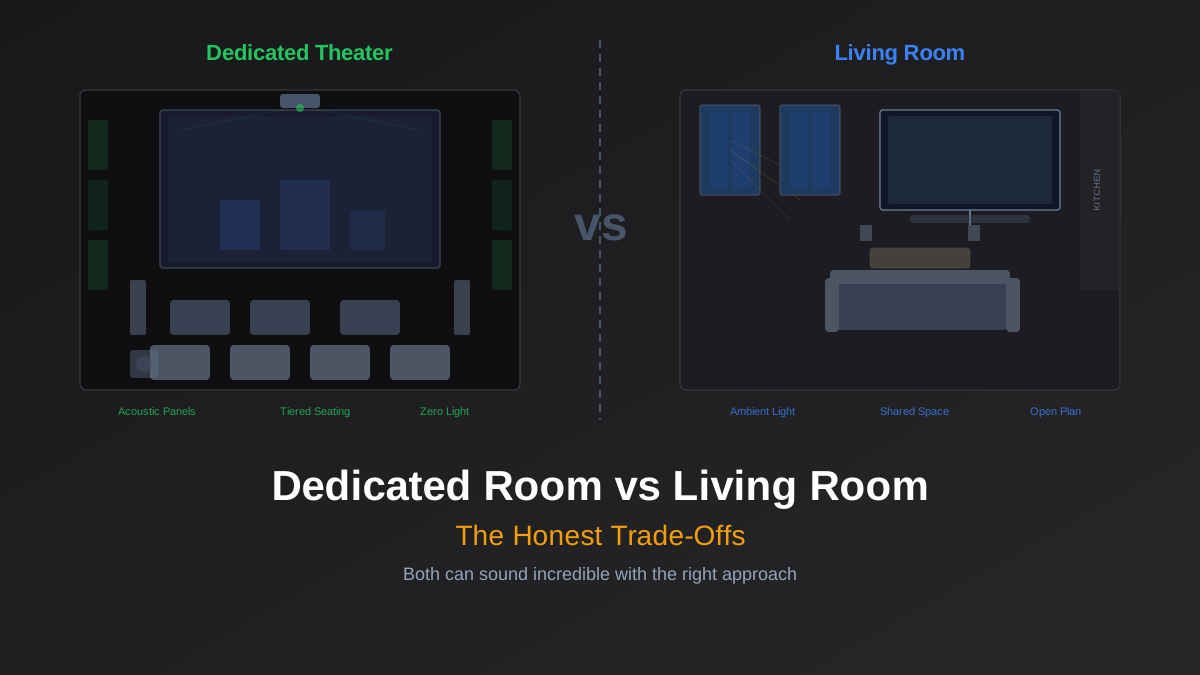
If you have a spare room with a door that closes, you have a dedicated theater room. Everything else is a living room setup. Both can be great; they just require different strategies.
The internet loves to gatekeep this. Browse r/hometheater long enough and you will find people insisting that anything short of a blacked-out basement with acoustic treatment is "not real home theater." That is nonsense. Some of the most enjoyable movie-watching experiences happen on a well-placed 65" OLED in a living room with a decent 5.1 system. But it is also true that a dedicated room, done right, can deliver an experience that no living room will ever match. The question is not which is "better" in the abstract. It is which one you actually have, and how to get the most out of it.
What a Dedicated Room Actually Gives You
The single biggest advantage of a dedicated room is light control. A room with no windows (or windows you can fully blackout) means you can run a projector at 100+ inches with deep, inky blacks and no washed-out highlights. Even a modest projector like the Epson LS12000 ($2,700) looks stunning in a pitch-dark room. An OLED in the same conditions is equally breathtaking, with its per-pixel dimming working at full potential instead of fighting reflections.
The second advantage is acoustic freedom. You can mount absorption panels at first reflection points, add bass traps in corners, and treat the ceiling without anyone asking why the living room looks like a recording studio. A room with even basic treatment (four 2" rockwool panels at first reflections, two corner bass traps) will sound dramatically better than an untreated room. The difference is not subtle. It is the difference between hearing dialogue clearly at moderate volume and cranking the center channel to compensate for room reflections.
Speaker placement is the third win. In a dedicated room, you place speakers where acoustics dictate: front L/R at ear level, tweeters aimed at the listening position, surrounds at 110-120 degrees. You are not working around a couch that has to face a fireplace, or cramming a center channel into a media console that is too narrow. Our acoustic treatment guide covers placement fundamentals in detail.
And then there is volume. Reference level for film (85 dB with 105 dB peaks) is genuinely loud. In a dedicated room with a solid door, you can run reference level at midnight without waking anyone. In a living room connected to a hallway and bedrooms, you are riding the volume knob constantly.
Rob's take
Dedicated rooms win on every acoustic metric but lose on one thing that matters: they get used less. A home theater room that requires deliberate effort to access is used for big events. A living room system gets used every day. For most households, the living room system that gets daily use delivers more value than the dedicated room that sits dark 20 hours a day. Build what you'll actually use.
The Living Room Reality
Most of us do not have a spare room. Or we have a spare room that is also a home office, a guest bedroom, or a playroom. The living room is where the TV goes, and that means compromises. But "compromise" does not mean "bad." It means different priorities.
Ambient light is the biggest factor. Living rooms have windows and open sightlines, which means your display needs to fight reflections and daylight. This is where the "projector vs TV" decision gets made for you: unless you have motorized blackout shades and only watch at night, a projector in a living room will look washed out during the day. An OLED or bright Mini LED is the right call. The LG C4 ($1,300 for 65") or Samsung S95D ($1,800 for 65") both handle ambient light well, with the Samsung's QD-OLED panel pushing brighter highlights that cut through room reflections.
Open floor plans create acoustic challenges that no amount of speaker quality can fully solve. When your living room opens into a kitchen and dining area, bass energy dissipates into a massive combined volume instead of pressurizing a smaller sealed space. A subwoofer that sounds authoritative in a 2,000 cubic foot room can sound thin when that room opens into 6,000 cubic feet of connected space. The fix is more sub output: dual subs, or a single ported sub like the SVS PB-2000 Pro ($1,100) that can move enough air to fill the space.
Furniture placement is dictated by the room's function, not by acoustics. The couch faces the TV, but it also needs to work for conversation, for reading, for the kids playing on the floor. Surrounds end up too close or too far. The center channel sits inside a media console firing into the back wall of the cabinet. These are real constraints that dedicated room owners never deal with.
Then there is the aesthetic factor. Your partner, your family, your guests all have to live with whatever you put in the room. Floor-standing towers with visible cables are a harder sell than slim on-wall speakers. A massive acoustic panel on the living room wall is a non-starter for most households. This is not a weakness to apologize for. It is a design constraint, same as any other.
Optimizing a Dedicated Room
If you have the room, here is where to focus your budget and effort:
- Paint the walls dark. Flat dark gray or charcoal on walls and ceiling. This costs almost nothing and eliminates light reflections that wash out your image. Matte finish is critical: semi-gloss paint reflects projector light back onto the screen.
- Acoustic treatment before speaker upgrades. Four 2"x24"x48" rockwool panels at first reflection points and two corner bass traps will do more for your sound quality than upgrading from $500 to $1,000 speakers. Treat the room first. GIK Acoustics panels ($60-80 each) are the standard recommendation for good reason.
- Projector over TV for screen size. In a light-controlled room, a projector gets you 100-130" for $2,000-4,000. A 98" TV costs $3,500-8,000. The math favors projectors in dedicated rooms. Use CinemaConfig's system builder to calculate the right screen size for your throw distance and seating position.
- Spend disproportionately on audio. In a dark room, even a mid-range projector looks great. But cheap speakers in a treated room still sound cheap. Allocate 50-60% of your budget to speakers, sub, and AVR. The room does half the work on the video side; it does none of the work on audio.
If you are working with a basement, our basement build guide covers the specific challenges (low ceilings, support columns, HVAC noise) in detail.
Optimizing a Living Room
Different room, different playbook:
- Prioritize the display. Your TV fights ambient light all day. This is the one component where the living room needs to outspend the dedicated room. Get the brightest, best-performing panel you can afford. An OLED is the default recommendation: infinite contrast means blacks still look black even with some ambient light, and peak brightness on current models (800-1,500 nits for WOLED, 1,500-2,000+ nits for QD-OLED) handles reflections well.
- Consider on-wall or in-wall speakers. Slim on-wall speakers like the KEF T series disappear into the room visually while still delivering excellent sound. In-wall speakers are even more invisible but require construction work. Either option solves the "floor-standing towers in the living room" objection. Check our speaker form factor comparison for the acoustic trade-offs.
- Wireless subwoofer placement. In a living room, the sub often cannot go in the acoustically ideal spot because that spot is where the couch is. A wireless sub kit ($30-50) lets you place the sub wherever it measures best without running a cable across the room. Run the subwoofer crawl, find the best spot, then figure out how to hide the sub there.
- Smart lighting integration. If you cannot black out the room, automate what you can. Hue or Lutron scenes that dim the lights to 5% when you say "movie time" make a real difference. It is not a dark room, but it is dramatically better than full overhead lighting.
- Use your AVR's room correction aggressively. Audyssey MultEQ XT32, Dirac Live, or YPAO in a living room with reflective surfaces and open floor plans is doing far more heavy lifting than the same software in a treated room. Run the calibration carefully, use all measurement positions, and consider Audyssey's app ($20) or Dirac Live for finer control.
If you are renting and cannot mount anything, our apartment guide covers renter-friendly approaches that still sound great.
Where the Budget Goes
The allocation strategy genuinely differs between the two setups. In a dedicated room, audio and projection eat 70% of the budget because the room itself handles light control and acoustics. In a living room, the display takes a bigger share because it has to overcome the environment on its own.
A rough split for a $3,000 dedicated room budget: $1,200 on a projector and screen, $1,200 on speakers and sub, $500 on an AVR, $100 on acoustic treatment materials. That same $3,000 in a living room: $1,500-1,800 on the best TV you can get, $600-800 on speakers and sub, $500 on an AVR, and whatever is left on smart lighting and cable management.
Neither allocation is wrong. They are optimizing for different constraints.
The Honest Answer
A dedicated theater room, properly treated and set up, will deliver a better pure home theater experience than any living room. That is just physics: controlled acoustics, zero ambient light, and optimal speaker placement will always beat a room that was designed for living first and watching movies second.
But "better" is not the only axis that matters. A living room setup that you actually use every night beats a dedicated room that sits empty because it is in the basement and nobody wants to walk down there. A system that your whole family enjoys beats one that only you appreciate. And a well-optimized living room with a great OLED, a solid 5.1 system, and smart lighting is not a consolation prize. It is a genuinely excellent way to watch movies and TV.
Start with the room you have. Optimize for its specific constraints. And if you ever get that spare room with a door that closes, you will know exactly what to do with it.
Rob Teller
Founder, CinemaConfig
15 years in consumer hardware and software, mostly on the product side. NZXT (cases and cooling), Asetek (liquid cooling, global sales), a short run advising on Alienware's roadmap at Dell, then four ... More about Rob · Affiliate disclosure

![Klipsch Reference vs Premiere: Differences and Picks [2026]](/images/blog/klipsch-speakers-guide.svg?dpl=dpl_A7yvEusbtVmAimLWJZTA31x7Ag82)
