Connect a Turntable to Your AVR Without Ruining the Sound, step by step
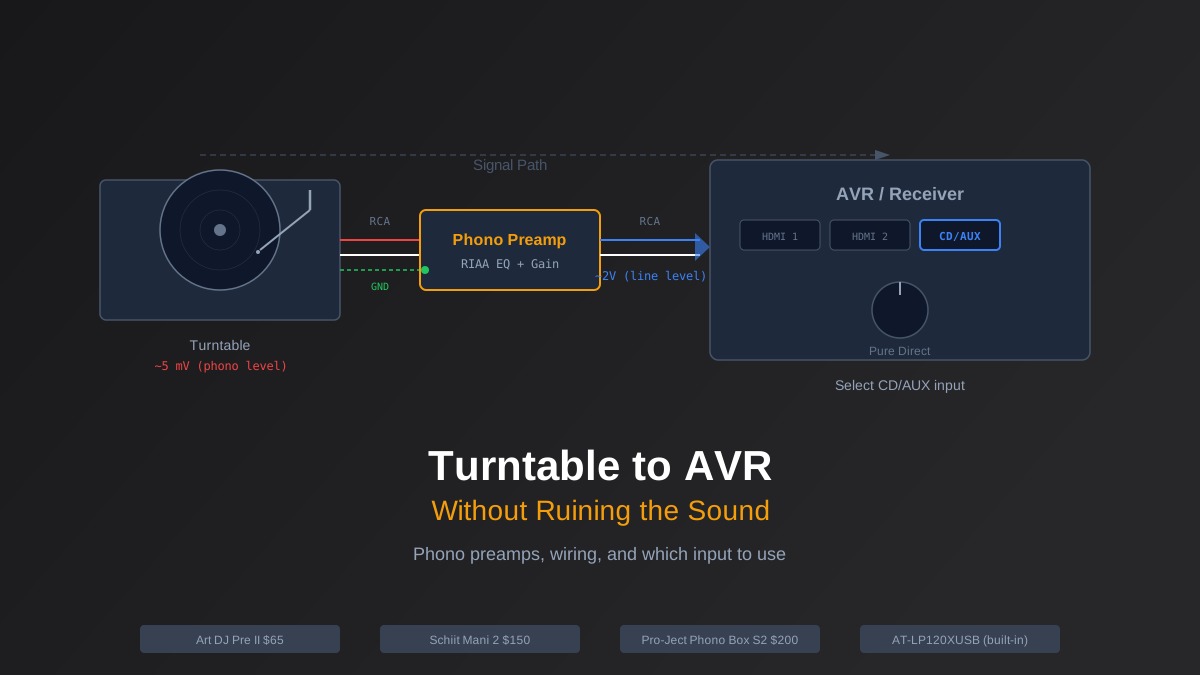
You just plugged your turntable into the back of your AVR, hit play, and something sounds very wrong. The music is thin, barely audible, and if you crank the volume to compensate it turns into a distorted mess. You did not break anything. You are just missing one piece of the signal chain that nobody warned you about.
Here is what is happening and exactly how to fix it.
Why Your Turntable Sounds Terrible Plugged Straight In
A turntable cartridge outputs a phono-level signal. That signal is roughly 100 to 1,000 times weaker than what your Blu-ray player, streaming box, or game console sends out. Those devices output line-level signal, which is what every input on your modern AVR expects to receive.
Back in the 1970s and 80s, every receiver had a dedicated phono input with a built-in phono preamp (also called a phono stage) that boosted that tiny signal up to line level and applied an EQ curve called RIAA equalization. Without RIAA EQ, vinyl sounds tinny and bass-light because the signal is intentionally cut and boosted during the pressing process.
Manufacturers started dropping phono inputs in the early 2000s as CD and then streaming took over. Today, almost no AVR under $2,000 includes one. Denon, Marantz, Yamaha, and Sony all assume you will handle phono preamplification externally. That means you need a phono preamp between your turntable and your receiver.
Rob's take
The phono preamp is the component most people get wrong in a turntable-to-AVR setup. Most AVRs don't have a phono input, which means you need an external phono preamp, and the quality of that preamp matters more than the cable or the turntable upgrade people spend money on. A $100 Schiit Mani 2 or iFi Zen Phono outperforms the built-in phono stages in most sub-$500 turntables.
Does Your Turntable Already Have One Built In?
Some turntables include a built-in phono preamp with a switch on the back labeled "Phono / Line." If yours has that switch, flip it to "Line," plug RCA cables into any open analog input on your AVR, and you are done. Skip to the wiring section below to double-check your setup.
Turntables with a built-in preamp:
- Audio-Technica AT-LP120XUSB ($350) - solid built-in preamp, great starter table. The switch is on the back near the RCA outputs.
- Fluance RT82 ($300) - built-in preamp, auto-stop feature, excellent value at its price point.
- Audio-Technica AT-LP60X ($150) - fully automatic, preamp always active, no switch needed. Budget-friendly but limited upgrade path.
Turntables without a built-in preamp:
- Pro-Ject Debut Carbon EVO ($600) - no preamp, requires external. This is intentional. The Carbon EVO is designed for people who want to choose their own phono stage.
- Rega Planar 1 / Planar 2 / Planar 3 ($475-$1,100) - no preamp on any model. Rega makes their own (the Fono Mini A2), but you have options.
- U-Turn Orbit ($250+) - optional preamp add-on, not included by default.
If your turntable does not have a built-in preamp, or if you want better sound than the built-in can deliver, you need an external phono preamp.
Three External Phono Preamps Worth Buying
The phono preamp market ranges from $30 to $3,000. At the low end, cheap units add noise and color the sound. At the high end, you are paying for marginal improvements. These three cover the range where real value lives.
ART DJ Pre II ($65) - The budget king. Surprisingly clean for the price, with an adjustable gain knob that lets you dial in the output level. It handles moving-magnet cartridges only, which covers 95% of turntables under $1,000. Powered by a wall wart, which is not elegant but keeps costs down. If you just want to get vinyl running through your home theater without overthinking it, start here.
Schiit Mani 2 ($150) - A meaningful step up. Four gain settings handle everything from low-output moving coils to hot moving magnets. Very low noise floor, which matters when you are amplifying a signal by 40+ dB. Built in the USA with a proper linear power supply inside the chassis. This is the sweet spot for most home theater vinyl setups.
Pro-Ject Phono Box S2 ($200) - If you own a Pro-Ject turntable, this pairs naturally, but it works with anything. Supports both MM and MC cartridges with subsonic filter to reduce rumble. Compact metal enclosure that tucks behind your AVR easily. Slightly warmer tonal balance than the Schiit, which some listeners prefer for late-night vinyl sessions.
Step-by-Step Wiring
Here is the complete signal chain from turntable to speakers:
- Turntable RCA outputs to phono preamp inputs. Use the RCA cables that came with your turntable. Left (white) to left, right (red) to right. If your turntable has a built-in preamp, set the switch to "Phono" (not "Line") so you are sending the raw signal to your external preamp.
- Ground wire. This is the thin wire with a spade or U-shaped connector hanging off the back of your turntable. Attach it to the ground post on your phono preamp. If you skip this step, you will get a loud 60Hz hum through your speakers. Every phono preamp has a ground terminal, usually a thumbscrew or binding post labeled "GND."
- Phono preamp outputs to AVR analog input. Use a decent pair of RCA cables (nothing exotic, just shielded). Plug into any open analog input on your AVR: "CD," "AUX," "Media Player," or similar. Do not use an input labeled "Phono" if your AVR happens to have one, because you would be running through two phono stages and the sound will be awful.
- Select the correct input on your AVR. Use your remote to switch to whatever input you plugged into. Rename it to "Vinyl" or "Turntable" in your AVR settings so you do not forget later.
AVR Settings That Matter
Once the signal chain is wired, a few settings on your AVR will make or break the listening experience.
Pure Direct mode: Most Denon, Marantz, and Yamaha receivers have a "Pure Direct" or "Direct" button. This bypasses the tone controls, room correction DSP, and any digital processing. The analog signal from your turntable stays analog all the way to the amplifier stage. For two-channel vinyl listening, this is almost always what you want. It removes the slight veil that DSP processing can add.
Speaker configuration: If you are listening in stereo, set your AVR to "Stereo" mode rather than any surround upmixing. Dolby Surround and DTS Neural:X can do interesting things with vinyl, but start with pure stereo and add processing later if you are curious.
Volume matching: Your phono preamp's output level might not match your other sources. If vinyl sounds noticeably quieter or louder than streaming, use your AVR's per-input level offset (usually in the setup menu under "Source Level Adjust" or similar) to compensate. That way you do not blow out your ears when switching from vinyl to Netflix.
When to Upgrade
If you are starting out, the ART DJ Pre II plus whatever turntable you already own is more than enough to enjoy vinyl through your home theater. The upgrade path from there is clear: move to a Schiit Mani 2 or Phono Box S2 when you upgrade your cartridge, and consider a dedicated two-channel amp fed from your AVR's pre-outs if you catch the audiophile bug.
For a deeper look at building a system that handles both critical music listening and surround sound movies, check out our audiophile home theater setup guide. And if you are still choosing a receiver, our AVR buying guide covers which models have the best analog input handling for vinyl.
The gap between "turntable collecting dust" and "vinyl sounding great through your home theater" is one $65 box and two RCA cables. Do not overthink it. Just wire it up and drop the needle.
Rob Teller
Founder, CinemaConfig
15 years in consumer hardware and software, mostly on the product side. NZXT (cases and cooling), Asetek (liquid cooling, global sales), a short run advising on Alienware's roadmap at Dell, then four ... More about Rob · Affiliate disclosure


